
The Division of Special Project Claims

Quick Links:
Note: Access to the Supplemental Pay Queue and Processed EAs Archive is permission-based. The links are available only to authorized Buffalo Public Schools staff who have been granted access.
Focus
Special Projects supports schools and departments with the financial and administrative management of grant-funded programs. Our office works to ensure grant funds are properly budgeted, monitored, and reported in accordance with approved grant budgets, grant requirements, and District procedures.
Our Responsibilities Include:
Select a topic below to learn more about our responsibilities.
Our Goal
Our goal is to provide schools and departments with clear and consistent support in the fiscal management of grant-funded programs—from initial budget setup through ongoing expenditures, budget modifications, reporting, reimbursement, and grant closeout—while ensuring grant funds are used in accordance with approved grant budgets, grant requirements, and District procedures.
Announcements/ Deadlines
It is the responsibility of individual school and central office administrators to ensure that these dates are met
How to Submit & Retrieve Extra Activity Sheets
To Submit Extra Activity Sheets
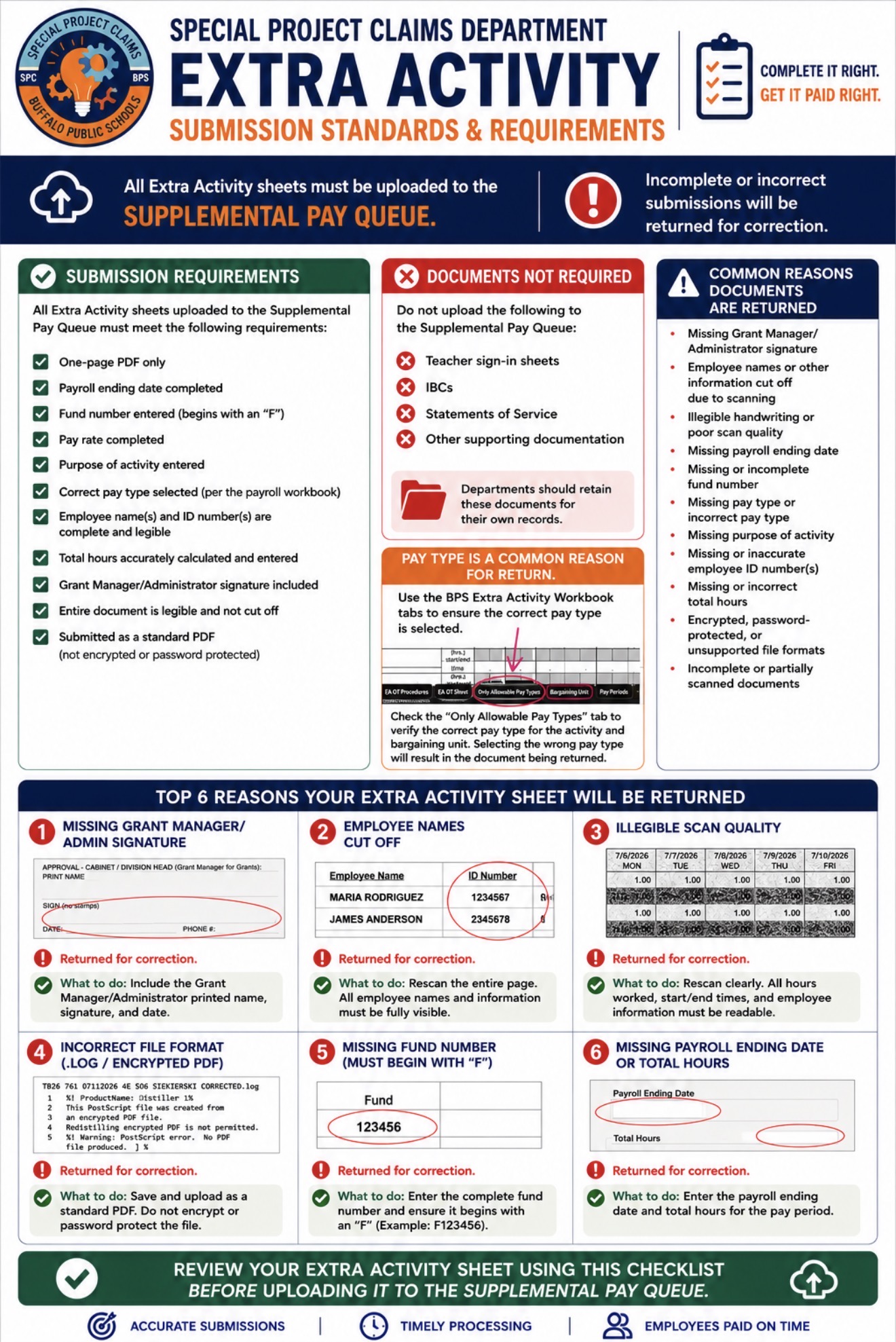
Complete the Extra Activity Sheet in its entirety.
Save the completed sheet as a one-page, editable, unlocked PDF.
Click the Supplemental Pay Queue button.
Upload your PDF to the queue.
Once your document has been successfully uploaded, no further action is required. Your sheet will remain in the queue until it has been processed.
Note: Access to the Supplemental Pay Queue and Processed EAs Archive is permission-based. The links are available only to authorized Buffalo Public Schools staff who have been granted access.
To Retrieve Processed Extra Activity Sheets
Click the Processed EAs Archive button.
Select the appropriate Payroll Ending Date.
Open the applicable Project folder.
Locate and download your processed Extra Activity Sheet.
Processed Extra Activity Sheets are organized by Payroll Ending Date and then by Project to make retrieval quick and easy.
Note: Access to the Supplemental Pay Queue and Processed EAs Archive is permission-based. The links are available only to authorized Buffalo Public Schools staff who have been granted access.
Important – Processed EA Archive: Before contacting Special Projects regarding a processed Extra Activity, please verify that you are checking the correct pay-period folder. Documents are filed according to the ACTUAL LAST DAY OF THE PAY PERIOD IN WHICH THE HOURS WERE WORKED, regardless of the pay-period date entered at the top of the Extra Activity sheet. Please do not use the date entered on the top left of the sheet to determine which folder to search.
Extra Activity Payment Status Inquiries
For inquiries regarding the status of an Extra Activity (EA) sheet, please follow the process below:
Check the Processed EAs Archive first to determine whether the Extra Activity sheet in question has already been processed by Special Projects.
If the sheet is located in the Processed EAs Archive, this confirms that it has been processed by Special Projects. Any questions regarding the payment status should then be directed to the Payroll Department.
Please contact Special Projects only if the Extra Activity sheet cannot be located in the Processed EAs Archive. At that time, we can review the submission and assist with determining its processing status.
Please note that once an Extra Activity sheet has been processed and placed in the Processed EAs Archive, Special Projects is unable to provide updates regarding when the payment will be issued.
Following this process will help ensure that inquiries are directed to the appropriate department and can be addressed as efficiently as possible.
Thank you for your cooperation.
Extra Activity Sheet Submission Process
1. Complete the Extra Activity Sheet in its entirety. Please verify that the following information is included and accurate:
Payroll ending date
Fund number (begins with an “F”)
Allowable pay type (refer to the Payroll workbook reference tab)
Employee names and accurate employee ID numbers
Dates worked and hours worked
Accurate total hours
Grant Manager/Administrator signature
2. Review the completed sheet before submission.
Ensure all information is complete, accurate, and legible.
If the sheet was prepared by a school clerk and is not legible, it should be returned to the school clerk for correction before submission.
The submitting department is responsible for verifying employee ID numbers and all required information prior to submission.
3. Save the completed sheet as an unlocked, editable, one-page PDF.
Password-protected files or files requiring permissions cannot be processed and will be returned.
4. Upload the completed PDF to the Supplemental Pay Queue.
Do not include IBCs, sign-in sheets, or other supporting documentation. Those records should be retained by your department.
5. If corrections are requested, make the necessary revisions and upload the corrected sheet to the Supplemental Pay Queue.
Uploading the corrected sheet creates a record of the resubmission and ensures our office processes the most current version.
If additional hours need to be reported, Payroll requires a new sheet containing only the missing time. Please do not resubmit the entire original sheet, as duplicate submissions may result in duplicate payment.
Sheets that are incomplete, illegible, password protected, missing required information, or submitted in a format that cannot be processed will be returned for correction and resubmission.
Following these steps will help ensure Extra Activity Sheets are processed accurately and efficiently while minimizing delays and unnecessary resubmissions.
Thank you for your cooperation.
If you have questions, please email us at specialprojectshelp
Calendar & Payroll Due Dates
Once submitted to our supplemental pay queue, no further action is necessary on your part. The submitted sheets will be visible in the queue until they have been processed. After processing, the approved copies can be retrieved on our Processed EAs Archive.